
Avantis enables you to sort, multi-sort, filter, and group your search result columns. Mastering these features can significantly improve your efficiency.
We recommend focusing on Grouping Your Search Results, as it offers a powerful way to organize and analyze data.
Below, you'll find step-by-step instructions and a video tutorial to help you get started.
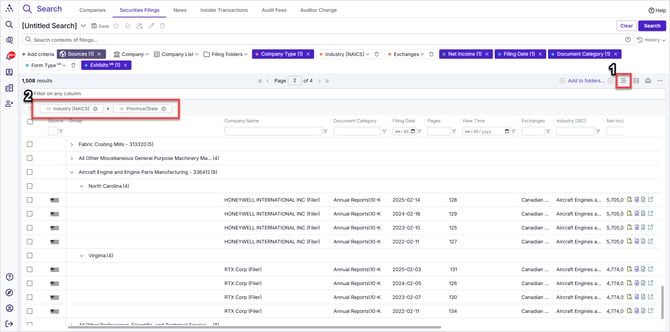
- Select the Row Grouping Icon
- Drag Column headers to Row Grouping Staging Area to hierarchically group your results based on the values in those columns
Video: Grouping Your Search Results
Grouping Your Search Results
You can group your search results to organize data based on specific column values. Follow these steps to apply grouping efficiently:
-
Open the Grouping Feature
-
Click the row grouping icon in the upper right of your result grid.
-
A grey section labeled "Drag here to set row groups" will appear directly above your column headers.
-
-
Create a Primary Grouping
-
Drag any column header into the grouping area.
-
Your results will be grouped based on the unique values in that column.
-
A count will display how many results fall into each group.
-
-
Add a Sub-Grouping
-
Drag a second column header into the grouping area, placing it on the right of the first one.
-
This will create sub-groups within the first grouping - again tallying totals per sub-groupo.
-
-
Change the Grouping Order
-
Swap the order of column headers in the grouping area by dragging the one on the right to the left instead.
-
This changes the primary and secondary grouping order.
-
-
Add More Groupings
-
Drag additional column headers to create more sub-groups based on different criteria.
-
By using this feature, you can efficiently categorize and analyze your search results.